楼主: n0b0dy
收起左侧

[卡巴教程] 自动激活 x 自动更新订阅 x 如何更优雅地使用测试版激活码

  [复制链接]
Balaor
头像被屏蔽
发表于 2026-8-14 07:48:34 | 显示全部楼层
顶起来。。
sweeb
发表于 2026-8-16 09:36:49 | 显示全部楼层
这个要得支持一下,感谢
不以风骚夺天下
发表于 2026-8-17 20:29:43 来自手机 | 显示全部楼层
goood!
指尖D沙漏
发表于 2026-8-22 22:49:59 | 显示全部楼层
好奇怪,三台电脑系统一样,其中2台正常使用复制的bat代码安装,另一台电脑就是运行bat文件一闪而过,但是运行其他bat文件又正常,百思不得其解
shwchsh
发表于 2026-8-26 23:42:26 | 显示全部楼层
支持windows 26H1
  1. [url=home.php?mod=space&uid=331734]@echo[/url] off

  2. REM Set the current directory and start a diagnostic log

  3. set "scriptDir=%~dp0"

  4. cd /d "%scriptDir%"

  5. set "logfile=%scriptDir%startup-debug.log"

  6. >>"%logfile%" echo.

  7. >>"%logfile%" echo ===== %date% %time% startup.bat started =====

  8. echo [DEBUG] Script started.

  9. echo [DEBUG] Log file: "%logfile%"

  10. >>"%logfile%" echo [DEBUG] Current directory: %CD%


  11. REM Step 1: Get admin rights

  12. echo [DEBUG] Checking administrator rights...

  13. >>"%logfile%" echo [DEBUG] Checking administrator rights...

  14. powershell -NoProfile -Command "$identity = [Security.Principal.WindowsIdentity]::GetCurrent(); $principal = New-Object Security.Principal.WindowsPrincipal($identity); if ($principal.IsInRole([Security.Principal.WindowsBuiltInRole]::Administrator)) { exit 0 } else { exit 1 }"

  15. set "adminCheckError=%errorlevel%"

  16. echo [DEBUG] Administrator check exit code: %adminCheckError%

  17. >>"%logfile%" echo [DEBUG] Administrator check exit code: %adminCheckError%

  18. if "%adminCheckError%" == "0" goto :gotAdmin


  19. echo [DEBUG] Requesting administrator rights...

  20. >>"%logfile%" echo [DEBUG] Requesting administrator rights...

  21. powershell -NoProfile -Command "Start-Process -FilePath '%ComSpec%' -ArgumentList '/d /c ""%~f0""' -Verb RunAs -WorkingDirectory '%~dp0'"

  22. set "elevationError=%errorlevel%"

  23. echo [DEBUG] Elevation launch exit code: %elevationError%

  24. >>"%logfile%" echo [DEBUG] Elevation launch exit code: %elevationError%

  25. if not "%elevationError%" == "0" (

  26.     echo [ERROR] Could not start the elevated copy. Was the UAC prompt cancelled?

  27.     >>"%logfile%" echo [ERROR] Could not start the elevated copy.

  28.     pause

  29. )

  30. exit /B


  31. :gotAdmin

  32. setlocal EnableExtensions EnableDelayedExpansion

  33. echo [DEBUG] Administrator rights confirmed.

  34. >>"%logfile%" echo [DEBUG] Administrator rights confirmed.


  35. if not exist "%scriptDir%startup.exe" (

  36.     echo [ERROR] startup.exe was not found in "%scriptDir%".

  37.     >>"%logfile%" echo [ERROR] startup.exe was not found.

  38.     pause

  39.     goto :done

  40. )


  41. REM Step 2: Get version information from startup.exe

  42. echo [DEBUG] Reading startup.exe version...

  43. >>"%logfile%" echo [DEBUG] Reading startup.exe version...

  44. for /f "usebackq delims=" %%i in (`powershell -command "& {(Get-Item '.\startup.exe').VersionInfo.ProductVersion}"`) do (

  45.     set "fullversion=%%i"

  46. )

  47. if not defined fullversion (

  48.     echo [ERROR] Could not read startup.exe ProductVersion.

  49.     >>"%logfile%" echo [ERROR] Could not read startup.exe ProductVersion.

  50.     pause

  51.     goto :done

  52. )

  53. echo [DEBUG] Product version: !fullversion!

  54. >>"%logfile%" echo [DEBUG] Product version: !fullversion!


  55. REM Extract just the first two segments (e.g., 21.20 from 21.20.8.505)

  56. for /f "tokens=1,2 delims=." %%a in ("!fullversion!") do (

  57.     set "majorversion=%%a.%%b"

  58. )

  59. if not defined majorversion (

  60.     echo [ERROR] Could not determine the major version.

  61.     >>"%logfile%" echo [ERROR] Could not determine the major version.

  62.     pause

  63.     goto :done

  64. )

  65. echo Detected Kaspersky version: !majorversion!

  66. set "registryPath=HKEY_LOCAL_MACHINE\SOFTWARE\WOW6432Node\KasperskyLab\AVP!majorversion!\environment"

  67. echo [DEBUG] Registry path: !registryPath!

  68. >>"%logfile%" echo [DEBUG] Registry path: !registryPath!


  69. REM Step 3: Ask user to choose

  70. :autoRenewal

  71. echo.

  72. echo Would you like to enable automatic license renewal?

  73. set "renewal="

  74. set /p renewal="Enter your choice (y/n): "

  75. if /I "!renewal!"=="y" (

  76.     goto :editionSelection

  77. ) else if /I "!renewal!"=="n" (

  78.     goto :installation

  79. ) else (

  80.     echo Invalid choice.

  81.     goto :autoRenewal

  82. )


  83. :editionSelection

  84. echo.

  85. echo Please select Kaspersky edition:

  86. echo 1. Standard

  87. echo 2. Plus

  88. echo 3. Premium

  89. echo.

  90. set /p edition="Enter your choice (1-3): "


  91. if "!edition!"=="1" (

  92.     set "editionName=Kaspersky Standard"

  93.     set "licenseKey=GAJPU-UTD18-3B2JJ-62CQ2"

  94. ) else if "!edition!"=="2" (

  95.     set "editionName=Kaspersky Plus"

  96.     set "licenseKey=GE86F-9WQRM-KK5PG-1ZE2W"

  97. ) else if "!edition!"=="3" (

  98.     set "editionName=Kaspersky Premium"

  99.     set "licenseKey=5AP55-UFAT1-QUMNN-7CUDZ"

  100. ) else (

  101.     echo Invalid choice.

  102.     goto :editionSelection

  103. )


  104. echo.

  105. echo Selected edition: !editionName!

  106. echo [DEBUG] Selected edition: !editionName!

  107. >>"%logfile%" echo [DEBUG] Selected edition: !editionName!


  108. :installation

  109. REM Step 4: Run "startup.exe" without self protection

  110. echo.

  111. echo Installing Kaspersky with self protection disabled...

  112. echo [DEBUG] Starting "%scriptDir%startup.exe"...

  113. >>"%logfile%" echo [DEBUG] Starting "%scriptDir%startup.exe" with /pSelfProtection=0

  114. start "" "%scriptDir%startup.exe" /pSelfProtection=0

  115. echo [DEBUG] start command exit code: !errorlevel!

  116. >>"%logfile%" echo [DEBUG] start command exit code: !errorlevel!


  117. REM Step 5: Monitor registry key and modify values during installation

  118. echo.

  119. echo Monitoring and updating registry values...

  120. set /a registryWait=0

  121. :checkRegistry

  122. REG QUERY "!registryPath!" /v "ProductStatus" >nul 2>&1

  123. if !errorlevel! equ 0 (

  124.     echo [DEBUG] Registry value found after !registryWait! checks.

  125.     >>"%logfile%" echo [DEBUG] Registry value found after !registryWait! checks.

  126.     echo Registry found, applying modifications...

  127.     REG ADD "!registryPath!" /v "ProductStatus" /t REG_SZ /d "" /f >nul 2>&1

  128.     echo [DEBUG] REG ADD exit code: !errorlevel!

  129.     >>"%logfile%" echo [DEBUG] REG ADD exit code: !errorlevel!

  130.     echo Registry modifications completed.

  131.     goto :setupTask

  132. ) else (

  133.     set /a registryWait+=1

  134.     echo [DEBUG] Registry value not found; retry !registryWait! in 5 seconds...

  135.     >>"%logfile%" echo [DEBUG] Registry value not found; retry !registryWait! in 5 seconds.

  136.     timeout /t 5 /nobreak >nul

  137.     goto :checkRegistry

  138. )


  139. :setupTask

  140. if /I "!renewal!"=="n" (

  141.     echo [DEBUG] Automatic renewal disabled; skipping scheduled task setup.

  142.     >>"%logfile%" echo [DEBUG] Automatic renewal disabled; skipping scheduled task setup.

  143.     goto :done

  144. )


  145. REM Step 6: Manage scheduled task for license renewal

  146. set /a avpWait=0

  147. :search

  148. REM Clear previous value

  149. set "avp="


  150. REM Search for avp.com under Kaspersky Lab directory

  151. for /f "delims=" %%A in ('dir /b /s /a-d "C:\Program Files (x86)\Kaspersky Lab\avp.com" 2^>nul') do (

  152.     set "avp=%%A"

  153. )


  154. if not defined avp (

  155.     set /a avpWait+=1

  156.     echo [DEBUG] avp.com not found; retry !avpWait! in 5 seconds...

  157.     >>"%logfile%" echo [DEBUG] avp.com not found; retry !avpWait! in 5 seconds.

  158.     timeout /t 5 >nul

  159.     goto :search

  160. )


  161. echo.

  162. echo Found avp.com at: !avp!

  163. >>"%logfile%" echo [DEBUG] Found avp.com at: !avp!

  164. echo Creating new license renewal task to run every 28 days...

  165. >>"%logfile%" echo [DEBUG] Creating scheduled task.


  166. set "taskname=Kaspersky License Renewal"

  167. set "xmlfile=%TEMP%\task.xml"


  168. REM Creating new license renewal task...

  169. schtasks /create /tn "%taskname%" /tr ""!avp!" LICENSE /add !licenseKey!" /sc DAILY /mo 28 /f >nul 2>&1

  170. set "taskCreateError=!errorlevel!"

  171. echo [DEBUG] schtasks create exit code: !taskCreateError!

  172. >>"%logfile%" echo [DEBUG] schtasks create exit code: !taskCreateError!

  173. if not "!taskCreateError!"=="0" (

  174.     echo [ERROR] Could not create the scheduled task.

  175.     >>"%logfile%" echo [ERROR] Could not create the scheduled task.

  176.     pause

  177.     goto :done

  178. )


  179. REM Exporting the task to XML...

  180. schtasks /query /tn "%taskname%" /xml > "%xmlfile%"

  181. set "taskQueryError=!errorlevel!"

  182. echo [DEBUG] schtasks query exit code: !taskQueryError!

  183. >>"%logfile%" echo [DEBUG] schtasks query exit code: !taskQueryError!


  184. if not "!taskQueryError!"=="0" (

  185.     echo [ERROR] Could not export the scheduled task XML.

  186.     >>"%logfile%" echo [ERROR] Could not export the scheduled task XML.

  187.     pause

  188.     goto :done

  189. )


  190. REM Modifying XML settings...


  191. REM Use PowerShell to update XML

  192. powershell -Command ^

  193.     "(Get-Content -Path '%xmlfile%') -replace '<StartWhenAvailable>false</StartWhenAvailable>', '<StartWhenAvailable>true</StartWhenAvailable>' |" ^

  194.     "ForEach-Object {$_ -replace '<DisallowStartIfOnBatteries>true</DisallowStartIfOnBatteries>', '<DisallowStartIfOnBatteries>false</DisallowStartIfOnBatteries>'} |" ^

  195.     "Set-Content -Path '%xmlfile%'" >nul 2>&1

  196. echo [DEBUG] XML update exit code: !errorlevel!

  197. >>"%logfile%" echo [DEBUG] XML update exit code: !errorlevel!


  198. REM Re-importing modified task...

  199. schtasks /delete /tn "%taskname%" /f >nul 2>&1

  200. schtasks /create /tn "%taskname%" /xml "%xmlfile%" /f >nul 2>&1

  201. echo [DEBUG] Scheduled task re-create exit code: !errorlevel!

  202. >>"%logfile%" echo [DEBUG] Scheduled task re-create exit code: !errorlevel!


  203. echo Task updated successfully.

  204. echo.

  205. echo Activating !editionName!...


  206. set /a startupWait=0

  207. :checkStartup

  208. REM Check if avp.exe is running

  209. tasklist | find /i "avp.exe" >nul 2>&1

  210. if !errorlevel! neq 0 (

  211.     set /a startupWait+=1

  212.     echo [DEBUG] avp.exe is not running; retry !startupWait! in 5 seconds...

  213.     >>"%logfile%" echo [DEBUG] avp.exe is not running; retry !startupWait! in 5 seconds.

  214.     timeout /t 5 >nul 2>&1

  215.     goto :checkStartup

  216. )


  217. echo [DEBUG] avp.exe is running; starting scheduled task.

  218. >>"%logfile%" echo [DEBUG] avp.exe is running; starting scheduled task.

  219. schtasks /run /tn "%taskname%"

  220. echo [DEBUG] schtasks run exit code: !errorlevel!

  221. >>"%logfile%" echo [DEBUG] schtasks run exit code: !errorlevel!


  222. echo.

  223. echo Selected edition: !editionName!

  224. echo Using version: !majorversion!

  225. echo License key: %licenseKey%


  226. :done

  227. echo Process completed successfully.

  228. >>"%logfile%" echo [DEBUG] Script finished.

  229. echo [DEBUG] Finished. Press any key to close this window.

  230. pause >nul

  231. endlocal

复制代码


我叫王臻
发表于 2026-8-29 18:44:02 | 显示全部楼层
感谢老哥,不过这个可以登陆账户吗,有啥影响没
metaverse
发表于 2026-9-7 08:37:15 | 显示全部楼层
我叫王臻 发表于 2026-8-29 18:44
感谢老哥,不过这个可以登陆账户吗,有啥影响没

试用版你登录账号干啥?最好不登免得被发现
sdtzsf
发表于 2026-9-7 20:47:29 | 显示全部楼层
指尖D沙漏 发表于 2026-8-22 22:49
好奇怪,三台电脑系统一样,其中2台正常使用复制的bat代码安装,另一台电脑就是运行bat文件一闪而过,但是 ...

是不是动服务或优化过后装的?
指尖D沙漏
发表于 2026-9-8 00:05:02 | 显示全部楼层
sdtzsf 发表于 2026-9-7 20:47
是不是动服务或优化过后装的?

没有处理过
魔王丶羽翼
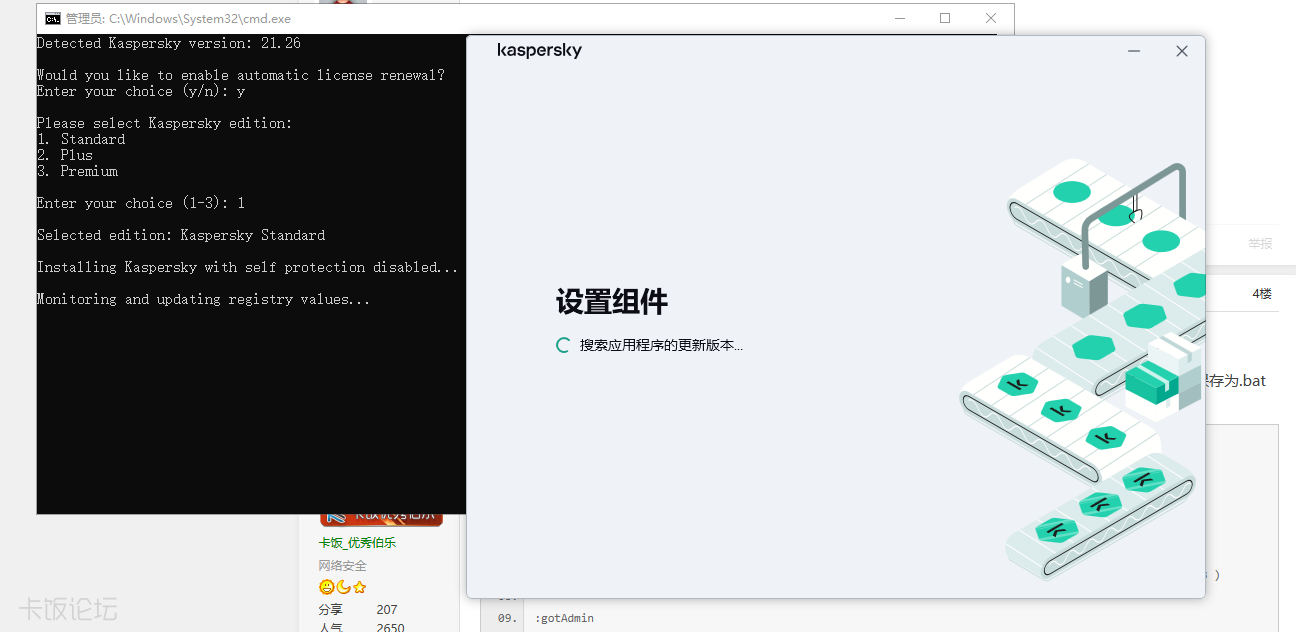
发表于 2026-9-17 17:52:27 | 显示全部楼层
一直卡在这界面,安装失败
QQ图片20260917175150.png
您需要登录后才可以回帖 登录 | 快速注册

本版积分规则

手机版|杀毒软件|软件论坛| 卡饭论坛

Copyright © KaFan  KaFan.cn All Rights Reserved.

Powered by Discuz! X3.4( 沪ICP备2020031077号-2 ) GMT+8, 2026-10-21 21:43 , Processed in 0.073881 second(s), 4 queries , Redis On.

卡饭网所发布的一切软件、样本、工具、文章等仅限用于学习和研究,不得将上述内容用于商业或者其他非法用途,否则产生的一切后果自负,本站信息来自网络,版权争议问题与本站无关,您必须在下载后的24小时之内从您的电脑中彻底删除上述信息,如有问题请通过邮件与我们联系。

快速回复 客服 返回顶部 返回列表