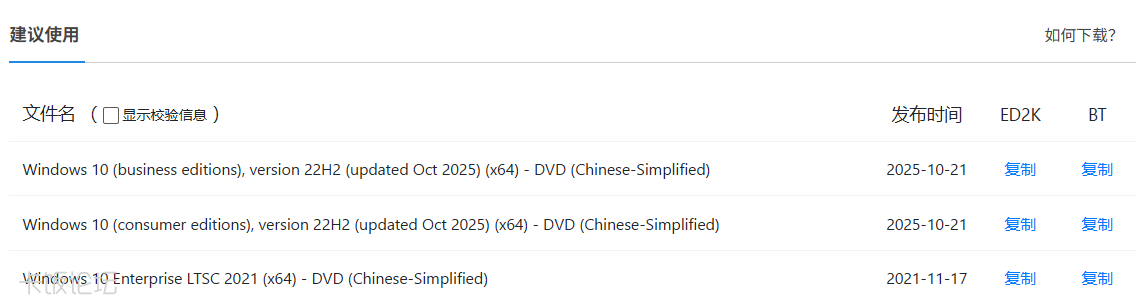
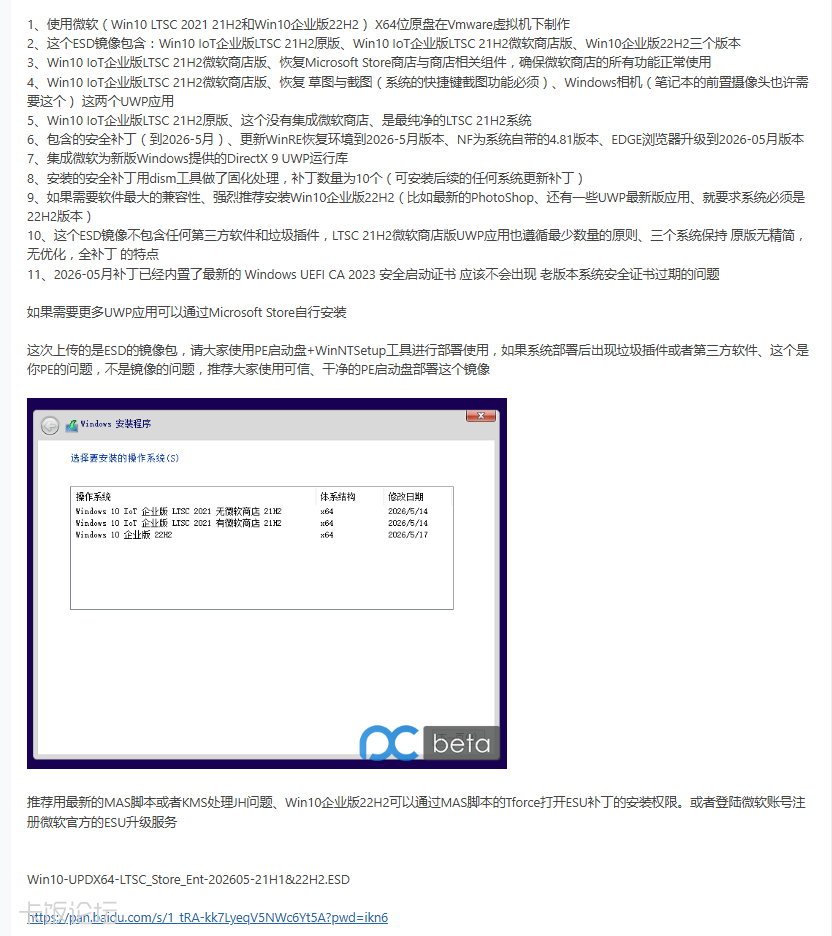
省流:目前获取到21年镜像,就是最新官方构建
没有带最新累积补丁的LSTC2021官方镜像
https://my.visualstudio.com
https://aka.ms/vss_products_list
https://aka.ms/Windows10/UpdateHistory
https://catalog.update.microsoft.com/Search.aspx?q=
https://visualstudio.microsoft.com/zh-hans/vs/pricing
https://learn.microsoft.com/zh-cn/visualstudio/subscriptions/download-software
https://learn.microsoft.com/zh-cn/visualstudio/subscriptions/software-download-list
https://visualstudio.microsoft.com/zh-hans/subscriptions/#软件和下载?cat=msdn-platforms-zh-hans
官方构建源头是微软MSDN付费订阅,VS软件和系统资源服务
最低订阅100美/月或1200美/年起供,第三方都是搬这的
查询过了,目前企业/物联网的LTSC2021版系统
均没最新官方构建(只有最初发布),要自行打补丁升级
关于更新,只需要累积更新,查阅最新补丁编号
在更新目录中搜索,下载全量离线补丁包后运行
打开官方补丁查阅网页,搜索21H1,选择最新补丁号并复制
打开更新目录网站,右上角粘贴补丁号,选x64LSTB下载
https://www.itsk.com/thread/435726
https://www.landian.news/archives/111810.html
https://www.landian.news/archives/112781.html
https://www.cve.org/CVERecord?id=CVE-2023-24932
https://msrc.microsoft.com/update-guide/vulnerability/CVE-2023-24932
https://support.microsoft.com/topic/7ff40d33-95dc-4c3c-8725-a9b95457578e
- 自今年05月12日补丁应用后
- %SystemRoot%\SecureBoot
- 详见 https://mp.weixin.qq.com/s/yaAikTpIe9ALh-volcxirg
- %SystemRoot%\System32\SecureBootUpdates\SKUSiPolicy.p7b
- 注册表安全启动路径(支持安全启动的全系统都有,控制系统是否应用安全启动更新)
- HKEY_LOCAL_MACHINE\SYSTEM\CurrentControlSet\Control\SecureBoot
- HKEY_LOCAL_MACHINE\SYSTEM\CurrentControlSet\Control\SecureBoot\Servicing
需要注意的是:如果系统中应用了系统安全启动证书更新
则主板固件中也需同步安装最新启动证书,否则拒绝启动
如果主板固件里已经应用了最新安全启动,而系统没有应用
也会发生拒绝启动现象,除非主板内关闭安全启动但有风险
如果主板固件里已经应用了最新安全启动,而PE没有应用
也会发生拒绝启动现象,除非主板内关闭安全启动但有风险
运行组策略, 依次进入(计算机配置>管理模板>Windows 组件>安全启动)
这里可决定系统是否应用安全启动证书更新,根据设备需要选未配置或已禁用
最新构建查询相关过程(正常登入查询,非伪造构建,原始回应太长,此处有剪辑)
Post
- https://my.visualstudio.com/_apis/AzureSearch/Search?upn=
- 请求载荷
- {
- "getAllResults": true,
- "searchText": "Windows 10",
- "productFamilyFacets": ["Windows 10 Enterprise LTSC 2021"],
- "productGroupFacet": "",
- "productId": "",
- "productName": "",
- "subscriptionLevel": "VSF-MDP-0001",
- "sortOption": null
- }
- {
- "count": 1,
- "selectedSortOption": 0,
- "searchResultsGroupByProduct": [
- {
- "productId": 8165,
- "productName": "Windows 10 Enterprise LTSC 2021",
- "displayName": "Windows 10 Enterprise LTSC 2021",
- "productVersion": "",
- "productEdition": "Enterprise",
- "productFamilyDescription": "Windows 10 Enterprise LTSC 2021",
- "productFamily": "Windows 10 Enterprise LTSC 2021",
- "latestReleaseDate": "2021-11-16T08:00:00+00:00",
- "score": 33.58,
- "isUserEligible": false
- }
- ],
- "searchResultsGroupByProductDisplayName": {
- "Windows 10 Enterprise LTSC 2021": [
- {
- "productId": 8165,
- "productName": "Windows 10 Enterprise LTSC 2021",
- "displayName": "Windows 10 Enterprise LTSC 2021",
- "productVersion": "",
- "productEdition": "Enterprise",
- "productFamilyDescription": "Windows 10 Enterprise LTSC 2021",
- "productFamily": "Windows 10 Enterprise LTSC 2021",
- "latestReleaseDate": "2021-11-16T08:00:00+00:00",
- "score": 33.58,
- "isUserEligible": false
- }
- ]
- },
- "productDisplayNames": [
- "Windows 10 Enterprise LTSC 2021"
- ],
- "productGroupFacetResults": [],
- "productFamilyFacetResults": [
- "Windows 10 Enterprise LTSC 2021"
- ]
- }
- https://my.visualstudio.com/_apis/AzureSearch/GetFilesForListOfProducts?upn=&mkt=
- 请求载荷
- [8165]
- {
- "filesForProducts": {
- "8165": {
- "productId": 8165,
- "fileDetailModels": [
- {
- "id": null,
- "productId": 8165,
- "fileId": 112238,
- "fileName": "en-us_windows_10_enterprise_ltsc_2021_x64_dvd_d289cf96.iso",
- "fileDescription": "Windows 10 Enterprise LTSC 2021 (x64) - DVD (English)",
- "sha256": "C90A6DF8997BF49E56B9673982F3E80745058723A707AEF8F22998AE6479597D",
- "fileType": "DVD",
- "architecture": "x64",
- "languageCode": "en",
- "languageName": "English",
- "releaseDate": "2021-11-16T16:00:00",
- "note": "<p>Windows 10 Enterprise LTSC 2021 builds on Windows 10 Pro, version 21H2 (released November 2021) adding premium features designed to address the needs of large and mid-size organizations (including large academic institutions), such as advanced protection against modern security threats, full flexibility of OS deployment, updating and support options; as well as comprehensive device and app management and control capabilities. </p> <p>The LTSC edition provides customers with access to the Long-Term Servicing Channel as a deployment option for their special-purpose devices and environments. This edition will not be updated with any new features, and features from Windows 10 that could be updated with new functionality are not included (e.g., Cortana and all in-box Universal Windows apps). Windows 10 Enterprise N LTSC 2021 includes the same functionality as Windows 10 Enterprise LTSC 2021, except that it does not include certain media related technologies (Windows Media Player, Camera, Music, TV and Movies) or the Skype app.</p>",
- "bootstrapperDownloadLink": ""
- },
- {
- "id": null,
- "productId": 8165,
- "fileId": 112305,
- "fileName": "zh-cn_windows_10_enterprise_ltsc_2021_x86_dvd_30600d9c.iso",
- "fileDescription": "Windows 10 Enterprise LTSC 2021 (x86) - DVD (Chinese-Simplified)",
- "sha256": "9F855FCC4CB44C119F9CE73DABE569FCB7F4F4D85F922206BF2E108116A34F25",
- "fileType": "DVD",
- "architecture": "x86",
- "languageCode": "cn",
- "languageName": "Chinese-Simplified",
- "releaseDate": "2021-11-16T08:00:00",
- "note": "<p>Windows 10 Enterprise LTSC 2021 builds on Windows 10 Pro, version 21H2 (released November 2021) adding premium features designed to address the needs of large and mid-size organizations (including large academic institutions), such as advanced protection against modern security threats, full flexibility of OS deployment, updating and support options; as well as comprehensive device and app management and control capabilities. </p> <p>The LTSC edition provides customers with access to the Long-Term Servicing Channel as a deployment option for their special-purpose devices and environments. This edition will not be updated with any new features, and features from Windows 10 that could be updated with new functionality are not included (e.g., Cortana and all in-box Universal Windows apps). Windows 10 Enterprise N LTSC 2021 includes the same functionality as Windows 10 Enterprise LTSC 2021, except that it does not include certain media related technologies (Windows Media Player, Camera, Music, TV and Movies) or the Skype app.</p>",
- "bootstrapperDownloadLink": ""
- },
- {
- "id": null,
- "productId": 8165,
- "fileId": 112268,
- "fileName": "zh-tw_windows_10_enterprise_ltsc_2021_x64_dvd_80dba877.iso",
- "fileDescription": "Windows 10 Enterprise LTSC 2021 (x64) - DVD (Chinese-Traditional)",
- "sha256": "FFDFEA3D3B77F041F019B9CC095E1197648BB689EC59582442460AD98E01347A",
- "fileType": "DVD",
- "architecture": "x64",
- "languageCode": "tw",
- "languageName": "Chinese-Traditional",
- "releaseDate": "2021-11-16T08:00:00",
- "note": "<p>Windows 10 Enterprise LTSC 2021 builds on Windows 10 Pro, version 21H2 (released November 2021) adding premium features designed to address the needs of large and mid-size organizations (including large academic institutions), such as advanced protection against modern security threats, full flexibility of OS deployment, updating and support options; as well as comprehensive device and app management and control capabilities. </p> <p>The LTSC edition provides customers with access to the Long-Term Servicing Channel as a deployment option for their special-purpose devices and environments. This edition will not be updated with any new features, and features from Windows 10 that could be updated with new functionality are not included (e.g., Cortana and all in-box Universal Windows apps). Windows 10 Enterprise N LTSC 2021 includes the same functionality as Windows 10 Enterprise LTSC 2021, except that it does not include certain media related technologies (Windows Media Player, Camera, Music, TV and Movies) or the Skype app.</p>",
- "bootstrapperDownloadLink": ""
- }
- ],
- "dropDownMap": {
- "architectures": {
- "x64": {
- "languages": {
- "en": {
- "fileTypes": {
- "DVD": {
- "fileIds": [112237, 112238],
- "fileType": "DVD"
- }
- },
- "languageCode": "en",
- "languageName": "English"
- },
- "cn": {
- "fileTypes": {
- "DVD": {
- "fileIds": [112267],
- "fileType": "DVD"
- }
- },
- "languageCode": "cn",
- "languageName": "Chinese-Simplified"
- },
- "tw": {
- "fileTypes": {
- "DVD": {
- "fileIds": [112268],
- "fileType": "DVD"
- }
- },
- "languageCode": "tw",
- "languageName": "Chinese-Traditional"
- }
- },
- "architectureCode": "x64"
- },
- "x86": {
- "languages": {
- "en": {
- "fileTypes": {
- "DVD": {
- "fileIds": [112275, 112276],
- "fileType": "DVD"
- }
- },
- "languageCode": "en",
- "languageName": "English"
- },
- "cn": {
- "fileTypes": {
- "DVD": {
- "fileIds": [112305],
- "fileType": "DVD"
- }
- },
- "languageCode": "cn",
- "languageName": "Chinese-Simplified"
- },
- "tw": {
- "fileTypes": {
- "DVD": {
- "fileIds": [112306],
- "fileType": "DVD"
- }
- },
- "languageCode": "tw",
- "languageName": "Chinese-Traditional"
- }
- },
- "architectureCode": "x86"
- }
- }
- }
- }
- }
- }
|




 发表于 2026-7-24 08:19:12
 楼主
楼主